Application Settings
Overview
The Application Settings page in AlarmInstall lets users configure app-level preferences.
Use this page when users need to:
- Change the application language.
- Select the application theme.
- Change biometric settings.
- Select the temperature scale.
- Review the application version and build number.
This page helps users personalize AlarmInstall behavior on the mobile device and confirm app version information for support or troubleshooting.
Before you begin
Dependencies
- Language availability depends on the app localization package.
- Theme options depend on the app version.
- Biometrics depend on the operating system.
- Temperature scale affects temperature values shown in parts of the app that display temperature.
- Version and build values depend on the installed app package.
Limitations
warning
Most settings apply automatically when changed.
Page layout
The Application Settings screen contains language, theme, login, behavior, and about sections.
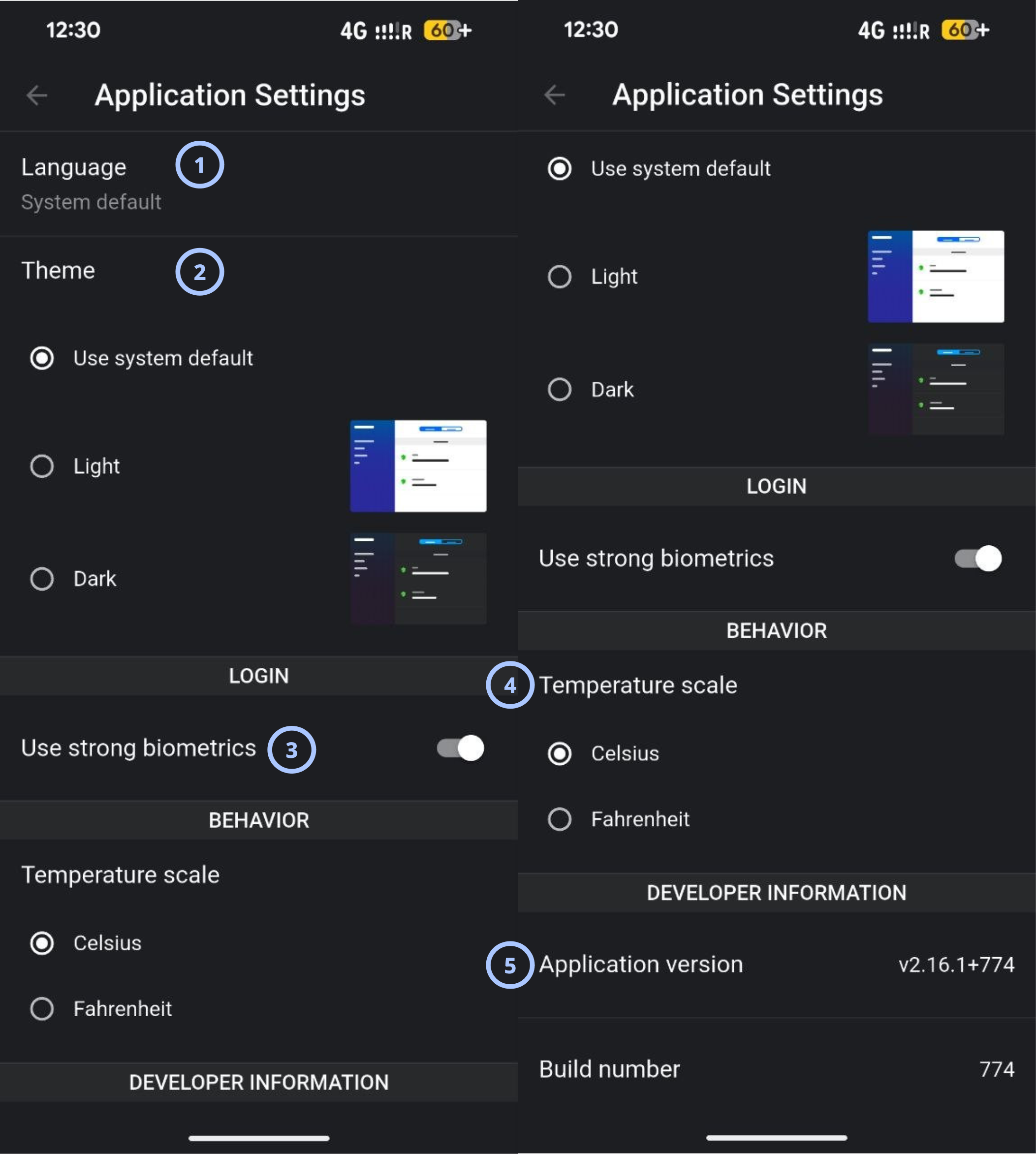
| Callout | UI element | Description | When to use |
|---|---|---|---|
| 1 | Language | Shows the selected app language. | Use to review or change the language used in the app. |
| 2 | Theme | Lets the user select the visual theme. Available options are Use system default, Light, and Dark. | Use to change the app appearance or follow the device theme. |
| 3 | Biometrics | Lets the user enable biometric login. | Use to enable biometric login for the app. |
| 4 | Temperature scale | Lets the user choose between Celsius and Fahrenheit. | Use to control how temperature values appear in the app. |
| 5 | Application version | Shows the installed application version. | Use when checking app version information for support or troubleshooting. |
info
On iOS devices, the Biometrics option supports both Face ID and Touch ID, depending on which biometric authentication method is available and enabled on the user's device.
How to use this page
Open Application Settings
- Open the AlarmInstall app.
- Open the
 menu.
menu. - Select Application Settings.
Change the application language
- Open Application Settings.
- Select Language.
- Choose the required language from the available list.
Change the app theme
- Open Application Settings.
- Go to the Theme section.
- Select one of the available options.
Change the login behavior
- Open Application Settings.
- Go to Login.
- Select the required option.
Change the temperature scale
- Open Application Settings.
- Go to Temperature scale.
- Select Celsius or Fahrenheit.
Check app version and build number
- Open Application Settings.
- Scroll to the ABOUT section.
- Review Application version.
- Review Build number.
Tips
tip
- Check Application version and Build number before contacting support. These values help identify the installed app package.
- Use Use system default if users want AlarmInstall to follow the mobile device appearance setting.
- Select the temperature scale that matches the user's region or site standard.
Troubleshooting
| Problem | Possible cause | What to try |
|---|---|---|
| The app language does not change |
|
|
| Theme does not change |
|
|
| Version information is needed for support |
|
|
Related pages
See also
Was this page helpful?