Adding your panel
Overview
info
Only for Remote mode.
The Add panel functionality allows installer to connect a compatible alarm panel to their AlarmInstall account. After a panel is added successfully, the installer can remotely configure it.
Installers typically access this page:
- during first-time system setup
- after creating a new AlarmInstall account
- when connecting an additional alarm system
This page also supports:
- assigning a display name to the alarm system
After successfully adding a panel, the system becomes available in the AlarmInstall dashboard.
Before you begin
Preconditions
Before adding a panel, ensure you have:
- A registered AlarmInstall account
- A compatible alarm system installed and online
- The following information:
- Panel ID or Serial Number
- Master Installer Code or authorized Installer Code
Dependencies
Panel registration requires:
- A supported alarm control panel
- Successful installer authentication within the application in remote mode
Limitations
warning
- Some systems may limit the number of linked installers or devices
- Installer permissions may restrict panel access
- Incorrect panel credentials prevent adding
- Certain advanced features depend on installer configuration, panel family and version
Page layout
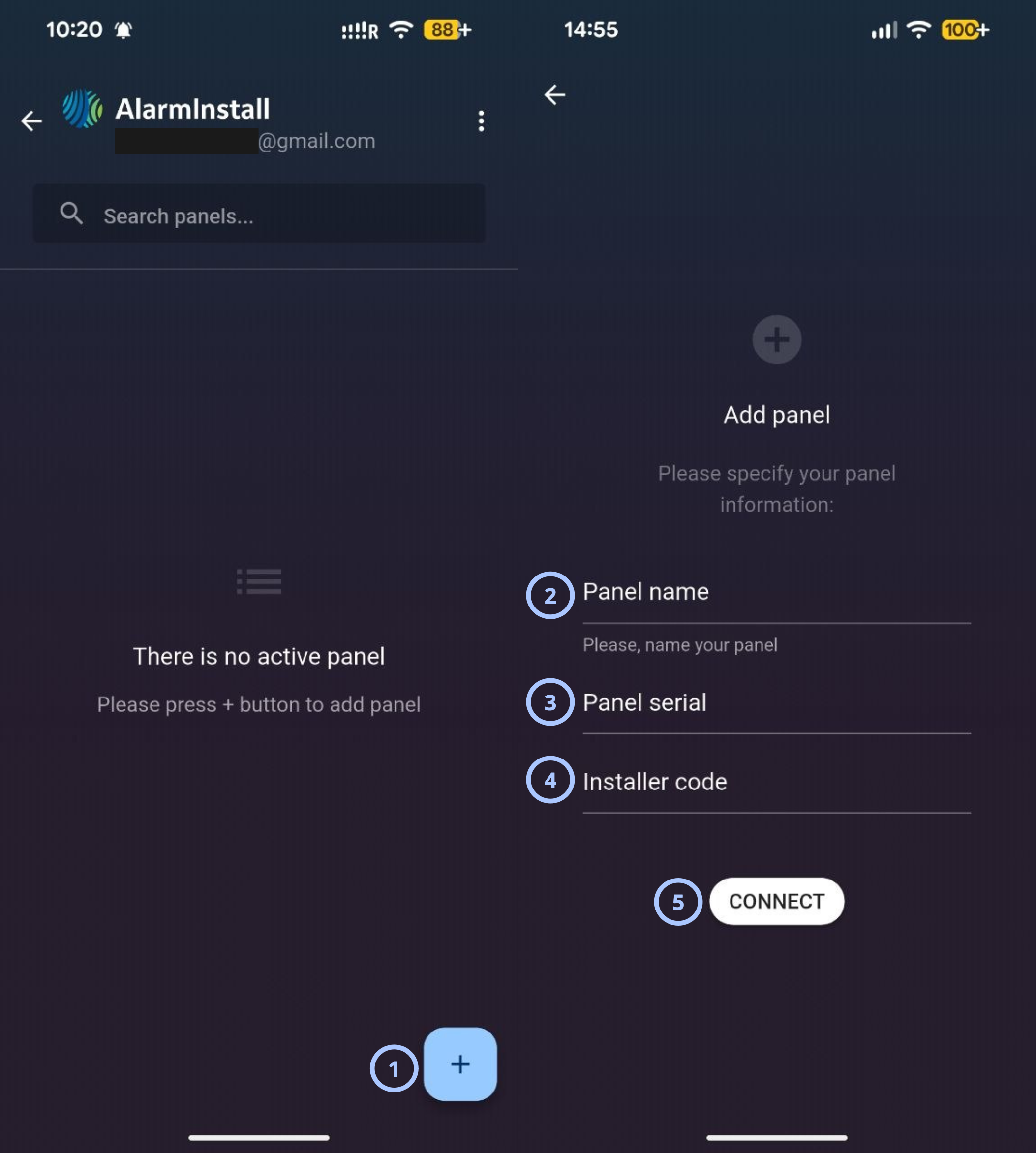
| Callout | Name | Behavior | Restrictions |
|---|---|---|---|
| 1 | Add panel |
| Not relevant |
| 2 | Panel name |
|
|
| 3 | Panel serial |
|
|
| 4 | Installer code |
|
|
| 5 | Connect |
| Not relevant |
How to use this page
Add a new panel
- Open the AlarmInstall application.
- Tap remote mode
- Sign in to your account.
- Tap Add panel.
- Enter a Panel name.
- Enter the Panel serial provided by the installer.
- Enter the Installer code.
- Tap Connect.
Tips
tip
- Use clear panel names when managing multiple locations.
- Store the Panel serial and Installer code securely.
- Verify all information before submission.
- Ensure the panel is powered on and connected to the PowerManage.
Troubleshooting
| Problem | Possible cause | What to try |
|---|---|---|
| Wrong infromation | Incorrect Panel Installer code or panel serial | Double check serial, installer code. |
| You are locked out | You are blocked due to multiple unsuccessful attempts | Wait, review the information, and try again |
Related pages
Was this page helpful?