Application modes
Overview
The Application modes page is the entry point for connecting the mobile application to a security panel. It allows users to choose how they want to access and manage the system.
The page provides two operating modes:
- Direct mode – Connects the mobile application directly to a local panel for installation, programming, testing, and maintenance tasks.
- Remote mode – Connects to supported panels remotely for configuration, diagnostics, and ongoing system management.
Use this page when you need to:
- Set up a new security system.
- Connect to a panel for programming or maintenance.
- Access panel functions remotely.
- Perform diagnostics or walk tests.
- Select the most appropriate connection method based on your location and network availability.
Before you begin
Preconditions
- The mobile application is installed.
- The target panel is powered on and operational.
- Network or local connectivity is available based on the selected mode.
- Valid credentials are available if authentication is required.
Dependencies
- Supported security panel firmware.
- Mobile device network connectivity.
- Panel communication services required for remote access.
Important limitations
warning
- Available functionality may vary depending on panel model and firmware version.
- Local mode is only available for supported panels. (IQ panels and PowerMaster 360/360R)
- Some configuration tasks may require direct access to the panel.
- Loss of network connectivity can interrupt remote operations.
Page layout
Application modes page
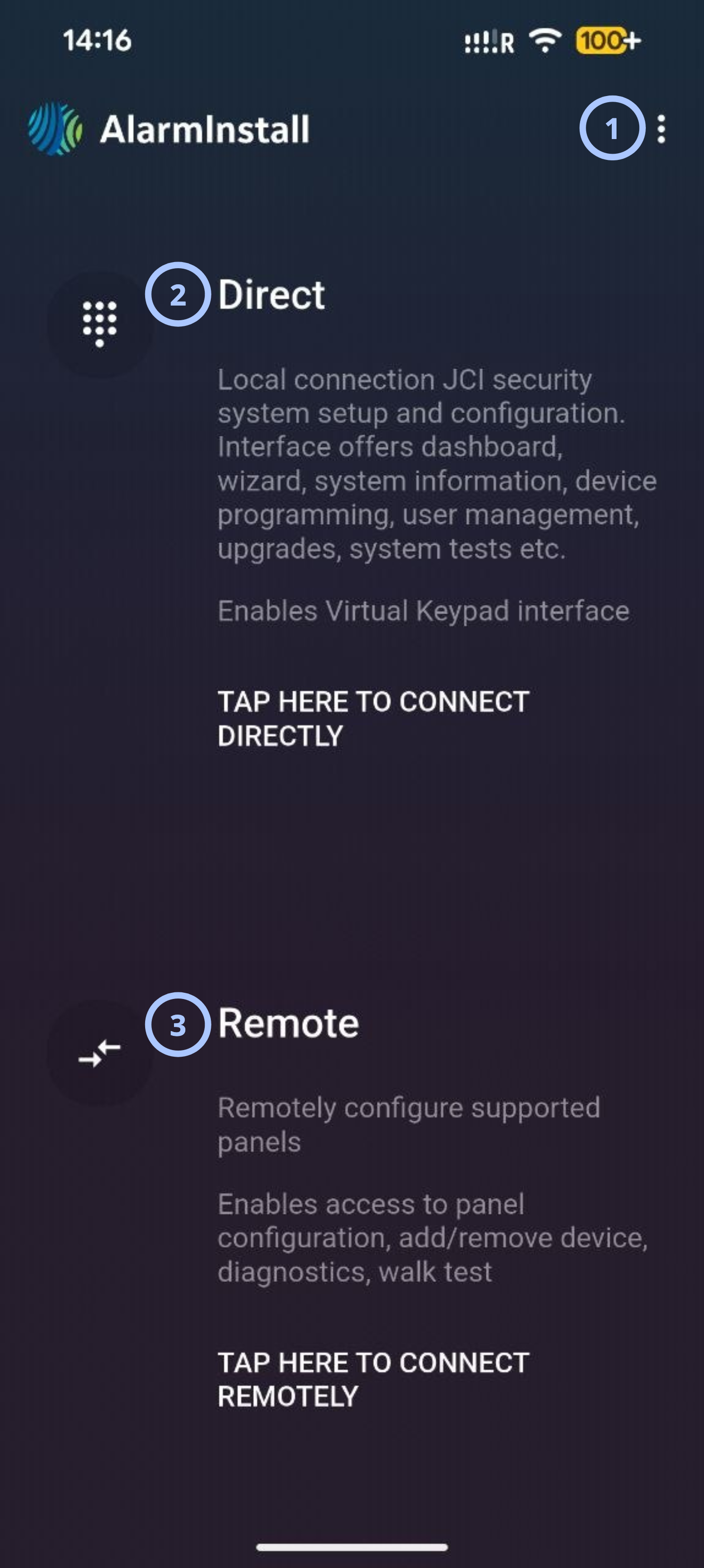
| Callout | UI element | Description | When to use |
|---|---|---|---|
| 1 | Options menu | Opens additional application options and settings. | Use when you need to access application-level actions or configuration settings. |
| 2 | Direct mode | Provides direct local access to a security panel. The interface supports dashboard access, setup wizard, system information, device programming, user management, system upgrades, testing functions. | Use when connected locally to the installation site and performing commissioning, programming, testing, or maintenance tasks. |
| 3 | Remote mode | Provides remote access to supported panels. The interface supports panel configuration, device management, diagnostics, and walk testing. | Use when panel administration or troubleshooting must be performed remotely. |
Direct mode
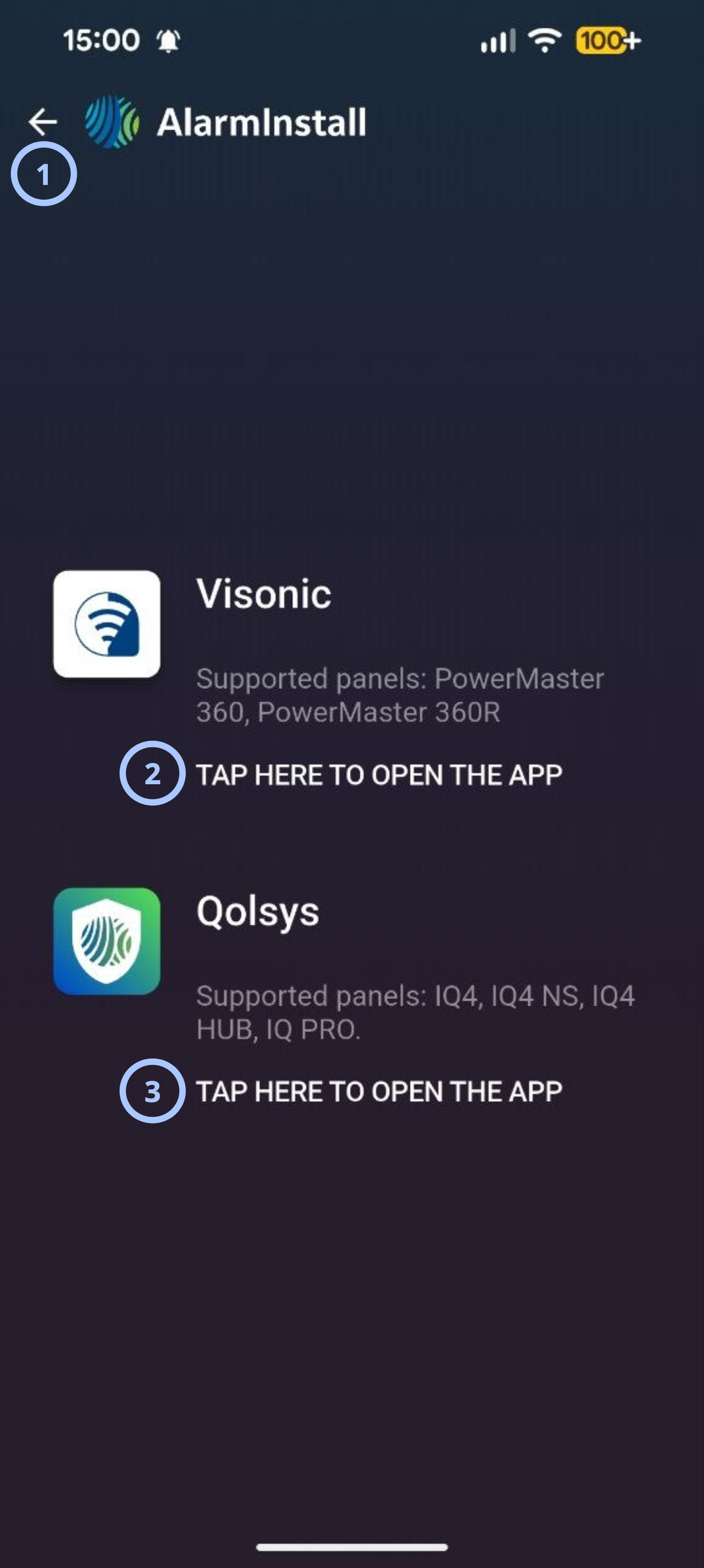
| Callout | UI element | Description | When to use |
|---|---|---|---|
| 1 | Back arrow / Page title | Displays the page name AlarmInstall and a back arrow to return to the previous screen. | Use the back arrow to navigate to the previous screen without making a selection. |
| 2 | Visonic entry — TAP HERE TO OPEN THE APP | Opens the Visonic manufacturer app. Supports PowerMaster 360 and PowerMaster 360R panels. | Use when working with a Visonic PowerMaster 360 or 360R panel. |
| 3 | Qolsys entry — TAP HERE TO OPEN THE APP | Opens the Qolsys manufacturer app. Supports IQ4, IQ4 NS, IQ4 HUB, and IQ PRO panels. | Use when working with a Qolsys IQ-series panel. |
The Direct mode section provides local connectivity to a panel.
Key capabilities described on the page include:
- Dashboard access.
- Setup wizard.
- System information.
- Device programming.
- User management.
- System upgrades.
- System testing.
Important behavior
- The application attempts to establish a local connection when selected.
- Local connectivity is required.
- Available functions depend on the connected panel.
Remote mode
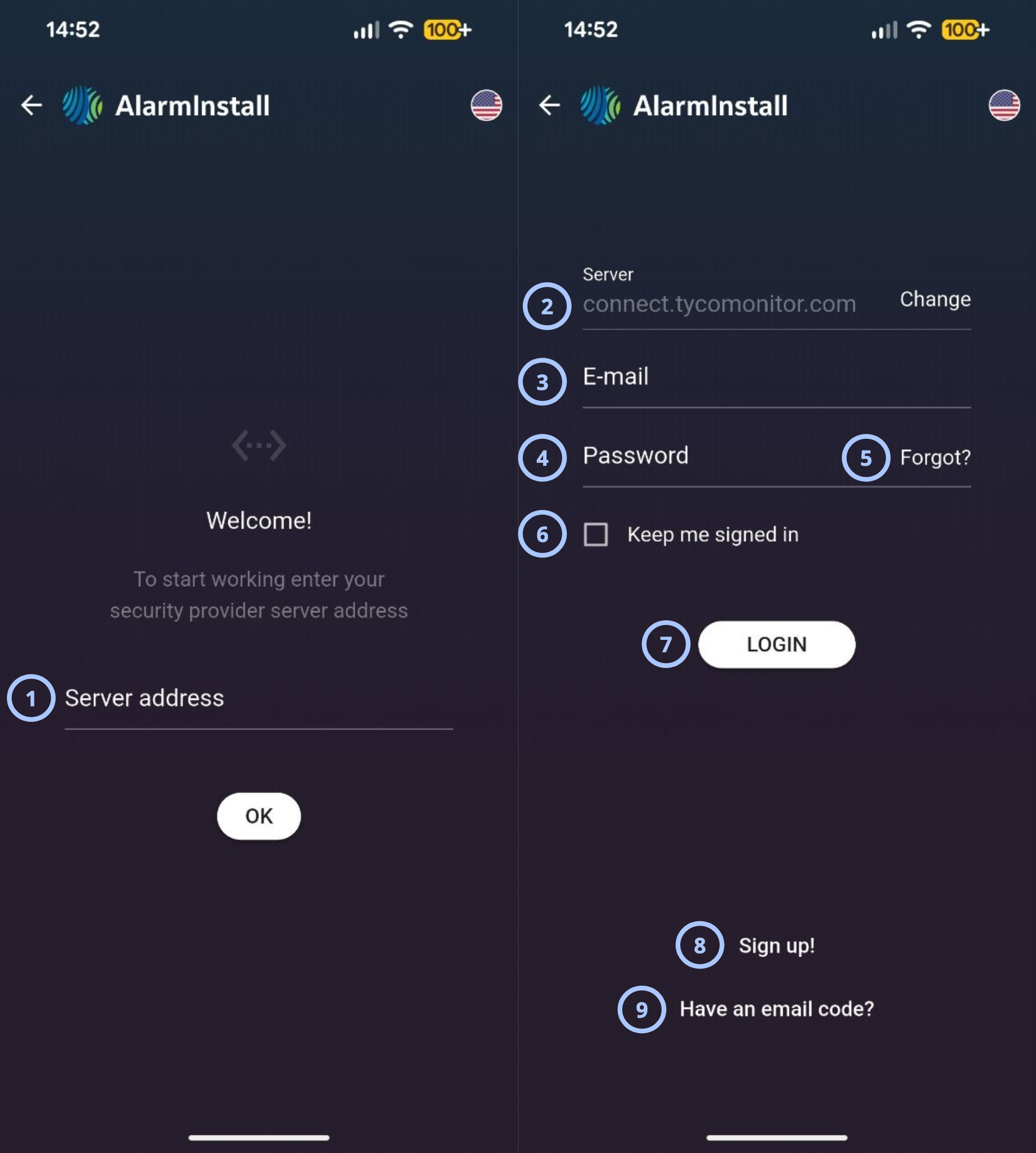
| Callout | Name | Behavior | Restrictions |
|---|---|---|---|
| 1 | Server address |
|
|
| 2 | Change |
| Not relevant |
| 3 |
|
| |
| 4 | Password |
|
|
| 5 | Forgot? |
| Not relevant |
| 6 | Keep me signed in |
|
|
| 7 | Login |
| Not relevant |
| 8 | Sign up! |
|
|
| 9 | Have an email code? |
|
|
The Remote mode section provides remote connectivity to supported panels.
Key capabilities described on the page include:
- Remote panel configuration.
- Add or remove devices.
- Diagnostics.
- Walk tests.
Important behavior
- Remote connectivity and panel communication services must be available.
- Available functions depend on panel capabilities.
Related pages
Was this page helpful?