Permissions
Overview
Use the Permissions page to configure what each PowerManage role can view, create, edit, run, remove, or manage.
Permissions are configured per role from Users & Access → Roles → Edit Permissions. Each permission can be set to Allow or Deny.
Roles support inheritance from a parent role. A child role inherits permission values from its parent role, but individual permissions can be overridden. Permissions can also be scoped by panel group.
Most permission sections include a List permission. In many sections, List is the base permission. Other permissions in the same section might have no visible effect if List is denied.
Before you begin
Before you edit role permissions, review the following requirements.
- Make sure you have permission to view roles.
- Make sure you have permission to list role permissions.
- Make sure you have permission to edit role permissions.
- Review the parent role before you override inherited permissions.
- Review group scope if the role must access only specific panel groups.
- It is better to read Roles before editing permissions. Permissions are edited from the role record and affect every employee assigned to that role.
- Access to the permissions management actions is controlled by the role permission group named "Roles".
Do not grant broad edit, remove, reset, or firmware permissions unless the role requires them. Use the least-privilege model when creating custom roles.
Layout
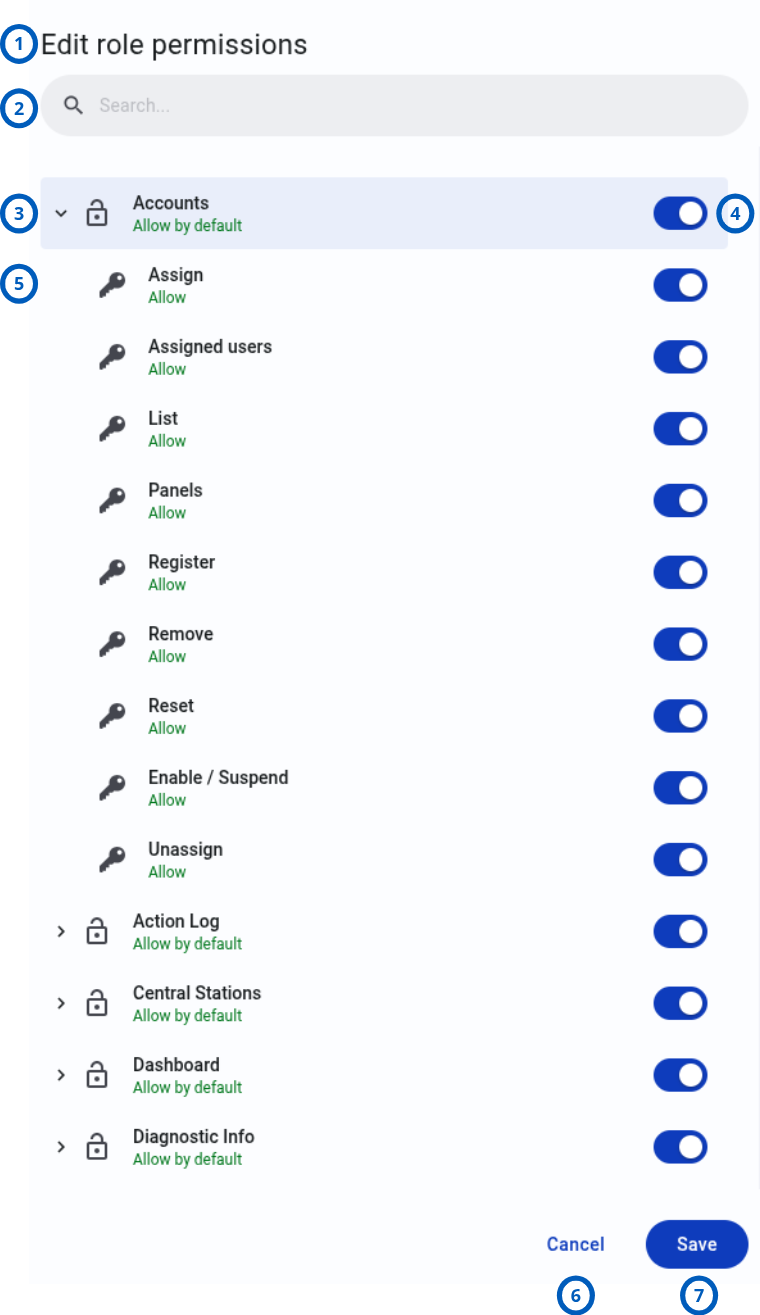
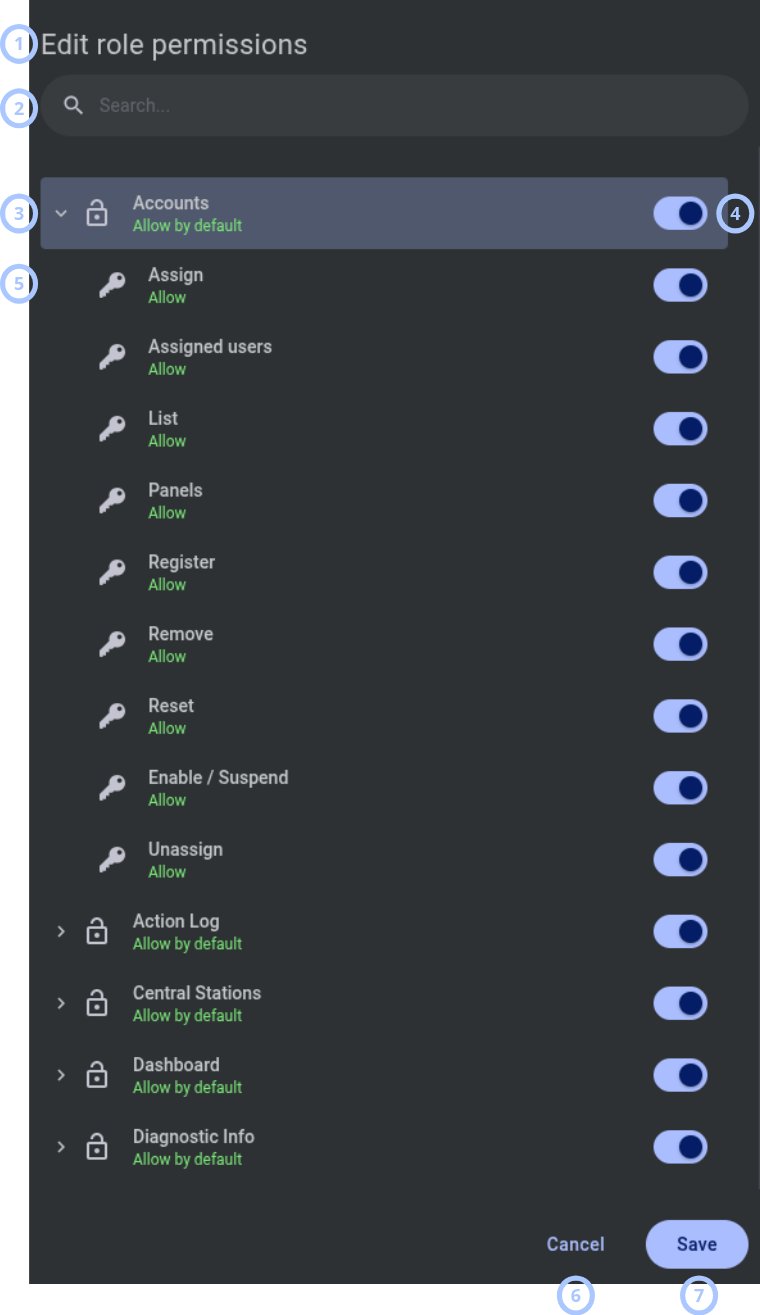
The Edit role permissions modal is divided into a permission search area, permission groups, permission controls, and action buttons.
| Callout | UI element | Description | When to use |
|---|---|---|---|
| 1 | Modal window name | Shows the modal name: Edit role permissions. | Use to confirm that you are editing permissions for the selected role. |
| 2 | Search field | Searches permissions by name. | Use to find a specific permission or permission group quickly. |
| 3 | Permission group | Shows a permission category, such as Accounts, Groups, Units, Roles, or Server Settings. | Use to review permissions by functional area. |
| 4 | Toggle | Enables or disables a permission or permission group. | Use to set the related permission to Allow or Deny. |
| 5 | Permission | Shows an individual permission inside a permission group. | Use to control access to a specific page, action, tab, widget, or API operation. |
| 6 | Cancel button | Closes the modal without saving changes. | Use when you do not want to apply permission changes. |
| 7 | Save button | Saves the permission changes for the role. | Use after reviewing all changed permissions. |
Accounts
Use Accounts permissions to manage customer accounts on the Accounts page. This area covers account registration, panel assignment, password reset, and account status changes.
Assign
- What this does: Allows assigning a customer account to one or more panels.
- When to use: Enable for roles that manage account-to-panel assignments.
- Impact: If denied, the Assign Panel action is unavailable.
Assigned users
- What this does: Allows viewing the list of customers already assigned to a specific panel.
- When to use: Enable for roles that must audit panel account assignments.
- Impact: If denied, assigned account information is not available for the panel.
List
- What this does: Allows viewing the Accounts page and the list of registered customer accounts.
- When to use: Enable as the base permission for roles that need account access.
- Impact: If denied, the Accounts page is hidden or returns no data.
Panels
- What this does: Allows viewing which panels are assigned to a customer in the account detail view.
- When to use: Enable for roles that review account assignments.
- Impact: If denied, assigned panels are not displayed in account details.
Register
- What this does: Allows creating new customer accounts on the PowerManage server.
- When to use: Enable for roles responsible for account onboarding.
- Impact: If denied, the role cannot register new accounts.
Remove
- What this does: Allows deleting customer accounts from the server.
- When to use: Enable only for trusted roles that manage account lifecycle.
- Impact: If denied, account removal is unavailable.
Reset
- What this does: Allows resetting a customer account password.
- When to use: Enable for support roles that handle account recovery.
- Impact: If denied, reset actions are unavailable.
Enable / Suspend
- What this does: Allows enabling or suspending customer accounts.
- When to use: Enable for roles that control account access.
- Impact: Suspended accounts cannot connect to panels or use mobile apps.
Unassign
- What this does: Allows unassigning a customer account from panels.
- When to use: Enable for roles that manage account-to-panel relationships.
- Impact: If denied, panel unassignment is unavailable.
Action Log
Use Action Log permissions to control access to the audit trail of GUI actions.
List
- What this does: Allows viewing the Action Log page and its entries.
- When to use: Enable for roles that review audit activity, operator actions, role changes, permission changes, login/logout activity, and panel operations.
- Impact: If denied, the Action Log tab is hidden. The log is filtered by assigned groups, so an employee limited to one empty group sees no entries.
Central Stations
Use Central Stations permissions to manage external monitoring receivers that receive events forwarded by PowerManage.
Add
- What this does: Allows creating Central Station connections.
- When to use: Enable for roles that configure monitoring receivers.
- Impact: The role can define a Central Station name, protocol, IP/port, and event profile.
Edit
- What this does: Allows editing existing Central Station settings.
- When to use: Enable for roles that maintain receiver configuration.
- Impact: The role can update name, protocol, description, CS profile, and connection parameters.
List
- What this does: Allows viewing the Central Stations page and configured CS connections.
- When to use: Enable as the base permission for Central Station access.
- Impact: If denied, the Central Stations page is hidden.
Remove
- What this does: Allows deleting Central Station configurations.
- When to use: Enable only for roles that administer receiver lifecycle.
- Impact: Removing a CS also removes related CS links from panel groups.
Dashboard
Use Dashboard permissions to control which widgets and charts are visible on the main Dashboard page after sign-in.
Alarmed & faulty equipment
- What this does: Allows viewing the Alarmed & faulty equipment widget.
- When to use: Enable for roles that monitor panels in alarm or fault state.
- Impact: If denied, the widget is not visible.
Billing Statistics
- What this does: Allows viewing the Billing Statistics widget.
- When to use: Enable for roles that review billing plan distribution and active or inactive panel counts.
- Impact: Requires a billing license.
Connected accounts
- What this does: Allows viewing the Connected accounts widget.
- When to use: Enable for roles that monitor active end-user app connections.
- Impact: If denied, the widget is not visible.
Events rate
- What this does: Allows viewing the Events rate chart.
- When to use: Enable for roles that monitor the rate of received events over time.
- Impact: If denied, the chart is not visible.
Online & connected equipment
- What this does: Allows viewing the Online & connected equipment widget.
- When to use: Enable for roles that monitor online panels compared with connected panels.
- Impact: If denied, the widget is not visible.
Process
- What this does: Allows viewing the Process widget.
- When to use: Enable for roles that monitor processes statuses.
- Impact: TIf denied, the widget is not visible.
Diagnostic Info
Use Diagnostic Info permissions to control access to the Diagnostics tab on the Dashboard page, including server metrics and network diagnostic tools.
Diagnostics
- What this does: Allows accessing network diagnostic tools, including DNS resolution, ICMP connection check, and trace route.
- When to use: Enable for roles that troubleshoot network connectivity and server reachability.
- Impact: If denied, network status tools are unavailable.
Metrics
- What this does: Allows viewing server system metrics, including system information, disk health, and services status.
- When to use: Enable for roles that monitor server health, resource utilization, and service availability.
- Impact: If denied, server metrics are unavailable.
Event Interface
Use Event Interface permissions for Event Interface Users (EIUs) and integrations that consume events through an API or live stream.
These permissions apply to the Event Interface User role. When creating an EIU employee under Users & Access → Employees, assign the Event Interface User role and then configure the permissions below to control what the EIU can access via the external login link. By default, all Event Interface permissions are allowed for the EIU role.
Delivery
- What this does: Allows viewing event delivery status information when logged in as an EIU.
- When to use: Enable for EIU roles that need to verify whether events were delivered to Central Stations or integrations.
- Impact: If denied, delivery status information is unavailable in the EIU session.
Export
- What this does: Allows exporting events from the Event Interface.
- When to use: Enable for roles that export event data.
- Impact: If denied, export actions are unavailable.
List
- What this does: Allows viewing or listing events in the Event Interface.
- When to use: Enable as the base permission for Event Interface access.
- Impact: Other Event Interface permissions are usually not useful without this permission.
Live
- What this does: Allows access to the live event stream.
- When to use: Enable for integrations or roles that need real-time event feeds.
- Impact: If denied, live streaming is unavailable.
Request
- What this does: Allows requesting Video on Demand (VOD) from within the EIU session.
- When to use: Enable for EIU roles that need to request new video clips from panel cameras after alarm events.
- Impact: If denied, the Request New Video button is unavailable in the EIU event view.
Events
Use Events permissions to control access to the Events page and event details in the GUI.
Attached Video
- What this does: Allows viewing video clips attached to alarm events.
- When to use: Enable for roles that review visual verification images or videos captured during alarm events.
- Impact: If denied, attached video is unavailable.
Delivery
- What this does: Allows viewing event delivery status.
- When to use: Enable for roles that verify delivery to Central Stations.
- Impact: If denied, delivery details are hidden.
Events List
- What this does: Allows viewing the main Events list.
- When to use: Enable as the base permission for Events page access.
- Impact: If denied, the Events page is hidden.
View Video on Demand
- What this does: Allows viewing and requesting Video on Demand clips linked to events.
- When to use: Enable for roles that review and request VOD clips.
- Impact: If denied, VOD event clips are unavailable.
Event View
- What this does: Allows opening and viewing individual event details.
- When to use: Enable for roles that investigate event records.
- Impact: If denied, event detail views are unavailable.
Firmware
Use Firmware permissions to control access to firmware management.
Unit / List
- What this does: Allows viewing the Firmware page with available firmware packages.
- When to use: Enable for roles that review firmware packages.
- Impact: If denied, the Firmware page is hidden.
Groups
Use Groups permissions to manage panel groups. Groups organize panels and control group-level settings such as supervision, notification profiles, customization, and CS links.
Add
- What this does: Allows creating panel groups.
- When to use: Enable for roles that organize panels into groups.
- Impact: The role can create groups with name, description, general and supervision settings, and CS links.
Customization
- What this does: Allows managing ConnectAlarm app customization per group.
- When to use: Enable for roles that configure group-specific themes, logos, and colors for the end-user mobile app.
- Impact: If denied, customization actions are unavailable.
Edit
- What this does: Allows editing existing group settings.
- When to use: Enable for roles that maintain group configuration.
- Impact: If denied, no section in the group can be edited.
List
- What this does: Allows viewing the Groups page and the list of groups.
- When to use: Enable as the base permission for group access.
- Impact: If denied, the Groups page is hidden.
Remove
- What this does: Allows deleting groups.
- When to use: Enable only for roles that administer group lifecycle.
- Impact: Main Group cannot be removed. Panels in a removed group are moved back to Main Group.
Notifications / Edit
- What this does: Allows editing notification settings within a group.
- When to use: Enable for roles that manage event profile notifications and end-user push notification configuration.
- Impact: If denied, group notification settings cannot be edited.
Notifications / List Event Profiles
- What this does: Allows viewing event notification profiles configured for the group.
- When to use: Enable for roles that review group event profile settings.
- Impact: If denied, event profile settings are unavailable.
Notifications / List User Notifications
- What this does: Allows viewing end-user notification configurations for the group.
- When to use: Enable for roles that review user notification availability.
- Impact: If denied, user notification settings are unavailable.
Installer App
Use Installer App permissions to control AlarmInstall mobile app functionality.
Basic Configurations
- What this does: Allows accessing and pushing basic configurations to panels from AlarmInstall.
- When to use: Enable for installers who apply basic panel configuration from the mobile app.
- Impact: If denied, basic configuration actions are unavailable in AlarmInstall.
Billing Plan Activation
- What this does: Allows requesting or changing billing plans for panels from AlarmInstall.
- When to use: Enable for roles that activate panel billing plans from the mobile app.
- Impact: If denied, billing plan activation is unavailable in the app.
Billing Plan Deactivation
- What this does: Allows deactivating billing plans for panels from AlarmInstall.
- When to use: Enable for roles that deactivate billing plans from the mobile app.
- Impact: If denied, billing plan deactivation is unavailable in the app.
Login
- What this does: Allows the employee to sign in to AlarmInstall.
- When to use: Enable for roles that require installer app access.
- Impact: If denied, the employee receives a 403 error and cannot access the app.
Preenroll Panels
- What this does: Allows pre-enrolling panels from AlarmInstall before physical installation.
- When to use: Enable for roles that pre-enroll panels, especially IQ panels.
- Impact: If denied, panel pre-enrollment is unavailable.
Remove panels
- What this does: Allows removing panels from AlarmInstall.
- When to use: Enable only for roles that are allowed to remove panels from the mobile app.
- Impact: If denied, panel removing is unavailable.
Installers
Use Installers permissions to manage installer accounts and installer assignments.
Accept
- What this does: Allows accepting installers.
- When to use: Enable when operator should have possibility to accept installers.
- Impact: If denied, accept actions are unavailable.
Add
- What this does: Allows creating installer accounts on the server.
- When to use: Enable for roles that onboard installers.
- Impact: If denied, installer creation is unavailable.
Assign
- What this does: Allows assigning installers to panels.
- When to use: Enable for roles that manage installer-to-panel assignments.
- Impact: If denied, installer assignment is unavailable.
List
- What this does: Allows viewing the list of installers.
- When to use: Enable as the base permission for installer management.
- Impact: If denied, the Installers tab is hidden.
Panels
- What this does: Allows viewing which panels are assigned to an installer.
- When to use: Enable for roles that review installer assignments.
- Impact: If denied, assigned panels are not visible in installer details.
Remove
- What this does: Allows deleting installer accounts.
- When to use: Enable only for trusted roles that manage installer account lifecycle.
- Impact: If denied, installer removal is unavailable.
Reset
- What this does: Allows resetting installer credentials.
- When to use: Enable for roles that support installer access recovery.
- Impact: If denied, reset actions are unavailable.
Unassign
- What this does: Allows unassigning installers from panels.
- When to use: Enable for roles that manage installer assignment cleanup.
- Impact: If denied, unassignment is unavailable.
Processes
Use Processes permissions to control access to processes.
List
- What this does: Allows viewing running and completed processes.
- When to use: Enable for roles that monitor background tasks.
- Impact: If denied, the Processes tab is hidden.
Stop
- What this does: Allows stopping or canceling active processes.
- When to use: Enable for roles that manage active background operations.
- Impact: If denied, stop actions are unavailable.
Remote Inspections
Use Remote Inspections permissions to control Remote Routine Inspection (RRI) functionality.
Run
- What this does: Allows starting a new remote inspection or scheduling recurring inspections.
- When to use: Enable for roles that perform panel health checks.
- Impact: If denied, run actions are unavailable.
List
- What this does: Allows viewing past and scheduled remote inspections.
- When to use: Enable as the base permission for Remote Inspections access.
- Impact: If denied, the RI page is hidden.
Review
- What this does: Allows viewing details of completed remote inspection results and marking results as viewed.
- When to use: Enable for roles that review inspection outcomes.
- Impact: If denied, review actions are unavailable.
Send
- What this does: Allows sending remote inspection reports.
- When to use: Enable for roles that email or distribute inspection results.
- Impact: If denied, send actions are unavailable.
Options / Edit
- What this does: Allows editing Remote Inspection settings or options.
- When to use: Enable for roles that configure inspection options.
- Impact: If denied, option editing is unavailable.
Options / Show
- What this does: Allows viewing the Remote Inspection options.
- When to use: Enable for roles that review inspection configuration.
- Impact: If denied, the options are unavailable.
Reports
Use Reports permissions to control report creation, review, download, and removal.
Add
- What this does: Allows creating reports.
- When to use: Enable for roles that create one-time, daily, weekly, or monthly scheduled reports.
- Impact: If denied, report creation is unavailable.
Download
- What this does: Allows downloading generated report files.
- When to use: Enable for roles that need report exports.
- Impact: If denied, report download is unavailable.
List
- What this does: Allows viewing the Reports page and existing reports.
- When to use: Enable as the base permission for report access.
- Impact: If denied, the Reports page is hidden.
Remove
- What this does: Allows deleting reports.
- When to use: Enable for roles that manage report lifecycle.
- Impact: If denied, report removal is unavailable.
Review
- What this does: Allows set reviewed status for reports.
- When to use: Enable for roles that set reviewed status for reports.
- Impact: If denied, review action is unavailable.
Stop
- What this does: Allows stopping an active report generation process.
- When to use: Enable for roles that manage running reports.
- Impact: If denied, stop actions are unavailable.
Roles
Use Roles permissions to manage roles under Users & Access → Roles.
Add
- What this does: Allows creating custom roles.
- When to use: Enable for administrators who create role definitions.
- Impact: If denied, role creation is unavailable.
Edit
- What this does: Allows editing role properties.
- When to use: Enable for administrators who update role name, assigned groups, or parent role.
- Impact: If denied, role editing is unavailable.
List
- What this does: Allows viewing the Roles page and all roles.
- When to use: Enable as the base permission for role management.
- Impact: If denied, the Roles page is hidden.
Remove
- What this does: Allows deleting roles.
- When to use: Enable only for trusted administrators.
- Impact: If a role has assigned employees, reassignment is required.
Permissions / Edit
- What this does: Allows editing permission toggles for a role.
- When to use: Enable for administrators who manage role permissions.
- Impact: If denied, the Edit Role Permissions modal window cannot be used for changes.
Permissions / List
- What this does: Allows viewing the current permission settings for a role.
- When to use: Enable for roles that need read-only permission review.
- Impact: If denied, permission settings are unavailable.
Unit
Use Unit permissions to control actions available when viewing a specific panel.
Activate
- What this does: Allows activating a panel.
- When to use: Enable for roles that change panels from not-active to active mode.
- Impact: If denied, activation is unavailable.
Encryption
- What this does: Allows viewing or managing panel encryption settings.
- When to use: Enable for roles that manage working key reset or encryption status.
- Impact: If denied, encryption actions are unavailable.
Gsmrssi Chart
- What this does: Allows viewing the GSM RSSI chart for a panel.
- When to use: Enable for roles that troubleshoot cellular signal strength.
- Impact: If denied, GSM RSSI charts are unavailable.
Initiate Emergency
- What this does: Allows remotely initiating an emergency alarm on the panel.
- When to use: Enable only for roles that require emergency initiation capability.
- Impact: The action can trigger a panic or emergency event.
Keypad
- What this does: Allows access to the Virtual Keypad.
- When to use: Enable for roles that interact with the panel keypad remotely through the GUI.
- Impact: If denied, Virtual Keypad access is unavailable.
Meteo
- What this does: Allows viewing meteo data.
- When to use: Enable for roles that review temperature or illuminance data.
- Impact: If denied, meteo data is unavailable.
Owner Info
- What this does: Allows viewing panel owner or customer information on the Info tab.
- When to use: Enable for roles that need owner details.
- Impact: If denied, owner information is hidden.
Panel Info
- What this does: Allows viewing panel technical information and editing available info fields.
- When to use: Enable for roles that review firmware version, IMEI, serial number, account, model, or related panel data.
- Impact: If denied, panel technical information is unavailable.
Wifi Rssi Chart
- What this does: Allows viewing the Wi-Fi RSSI chart for a panel.
- When to use: Enable for roles that troubleshoot Wi-Fi signal strength.
- Impact: If denied, Wi-Fi RSSI charts are unavailable.
Automation / Set Icon
- What this does: Allows setting a custom icon for an automation device.
- When to use: Enable for roles that customize automation device appearance in the GUI.
- Impact: If denied, icon changes are unavailable.
Automation / List
- What this does: Allows viewing the list of automation devices on the Automation tab.
- When to use: Enable as the base permission for automation device access.
- Impact: If denied, the Automation tab is hidden.
Automation / Control / Device Disable
- What this does: Allows disabling an automation device.
- When to use: Enable for roles that manage automation device availability.
- Impact: If denied, the disable action is unavailable.
Automation / Control / Device Enable
- What this does: Allows enabling an automation device.
- When to use: Enable for roles that manage automation device availability.
- Impact: If denied, the enable action is unavailable.
Automation / Control / Dimmer Control
- What this does: Allows controlling dimmer devices, including setting brightness levels.
- When to use: Enable for roles that operate dimmer switches.
- Impact: If denied, dimmer control actions are unavailable.
Automation / Control / Doorlock Control
- What this does: Allows controlling door lock devices, including lock and unlock operations.
- When to use: Enable for roles that operate door locks remotely.
- Impact: If denied, door lock control actions are unavailable.
Automation / Control / Garage Door Control
- What this does: Allows controlling garage door devices, including open and close operations.
- When to use: Enable for roles that operate garage doors remotely.
- Impact: If denied, garage door control actions are unavailable.
Automation / Control / Thermostat Control
- What this does: Allows controlling thermostat temperature setpoints and operating modes.
- When to use: Enable for roles that manage thermostat settings remotely.
- Impact: If denied, thermostat control actions are unavailable.
Automation / Control / Thermostat Fan
- What this does: Allows controlling the thermostat fan mode.
- When to use: Enable for roles that manage thermostat fan settings remotely.
- Impact: If denied, fan mode control is unavailable.
Automation / Control / Water-valve Control
- What this does: Allows controlling water valve devices, including open and close operations.
- When to use: Enable for roles that operate water valves remotely.
- Impact: If denied, water valve control actions are unavailable.
Backups / Apply
- What this does: Allows applying a saved configuration backup to the panel.
- When to use: Enable for roles that restore panel configuration from a previous backup.
- Impact: If denied, backup apply actions are unavailable.
Backups / Exclude from Rotation
- What this does: Allows excluding a backup from the automatic backup rotation schedule.
- When to use: Enable for roles that manage which backups are preserved or rotated.
- Impact: If denied, rotation exclusion is unavailable.
Backups / List
- What this does: Allows viewing available configuration backups.
- When to use: Enable as the base permission for backup access.
- Impact: If denied, backups are hidden.
Backups / Swap Panel
- What this does: Allows applying a backup configuration to a different panel for panel replacement scenarios.
- When to use: Enable for roles that handle panel swaps where configuration must transfer to a replacement panel.
- Impact: If denied, panel swap actions are unavailable.
Billing / Activate
- What this does: Allows activating a billing plan for the panel.
- When to use: Enable for roles that manage panel billing plan activation.
- Impact: Requires a billing license.
Billing / Deactivate
- What this does: Allows deactivating a billing plan for the panel.
- When to use: Enable for roles that manage panel billing plan deactivation.
- Impact: Requires a billing license.
Billing / Status
- What this does: Allows viewing the current billing plan status for the panel.
- When to use: Enable for roles that review panel billing information.
- Impact: Requires a billing license.
Config / Exclude from rotation
- What this does: Allows excluding configuration from automatic rotation.
- When to use: Enable for roles that manage which configuration participate in rotation cycles.
- Impact: If denied, rotation exclusion is unavailable.
Config / Download
- What this does: Allows downloading configuration from the panel to the server.
- When to use: Enable for roles that retrieve the current panel configuration.
- Impact: If denied, configuration download is unavailable.
Config / Export
- What this does: Allows exporting panel configuration to a file.
- When to use: Enable for roles that save configuration files for offline review or transfer.
- Impact: If denied, configuration export is unavailable.
Config / Upload
- What this does: Allows uploading configuration from the server to the panel.
- When to use: Enable for roles that push configuration changes to panels.
- Impact: If denied, configuration upload is unavailable.
Config / View
- What this does: Allows viewing panel configuration on the Configuration tab.
- When to use: Enable as the base permission for configuration review.
- Impact: If denied, configuration viewing is unavailable.
Customers / Add Proximity Tag
- What this does: Allows adding proximity tags to a customer user on the panel.
- When to use: Enable for roles that manage customer proximity tag enrollment.
- Impact: If denied, proximity tag addition is unavailable.
Customers / Disable
- What this does: Allows disabling a customer user code on the panel.
- When to use: Enable for roles that manage customer code availability.
- Impact: If denied, customer disable actions are unavailable.
Customers / List
- What this does: Allows viewing the list of customers assigned to the panel on the Customers tab.
- When to use: Enable for roles that manage customers.
- Impact: If denied, the Customers tab is hidden.
Customers / Set Code
- What this does: Allows setting or changing a customer user code on the panel.
- When to use: Enable for roles that manage customer access codes.
- Impact: If denied, code changes are unavailable.
Customers / Set Expiration Date
- What this does: Allows setting an expiration date for a customer user code.
- When to use: Enable for roles that manage time-limited customer access.
- Impact: If denied, expiration date changes are unavailable.
Customers / Set Label
- What this does: Allows setting or changing a customer label on the panel.
- When to use: Enable for roles that manage customer display names.
- Impact: If denied, label changes are unavailable.
Customers / Set Last Name
- What this does: Allows setting or changing a customer last name on the panel.
- When to use: Enable for roles that manage customer identity fields.
- Impact: If denied, last name changes are unavailable.
Customers / Set Partitions
- What this does: Allows setting partition access for a customer user on the panel.
- When to use: Enable for roles that manage which partitions a customer can control.
- Impact: If denied, partition assignment changes are unavailable.
Customers / Set User Door Locks
- What this does: Allows setting door lock access for a customer user on the panel.
- When to use: Enable for roles that manage which door locks a customer can operate.
- Impact: If denied, door lock assignment changes are unavailable.
Devices / Add Automation Device
- What this does: Allows adding automation devices to the panel.
- When to use: Enable for roles that enroll smart home devices such as smart plugs, dimmers, thermostats, door locks, water valves, or garage doors.
- Impact: If denied, automation device addition is unavailable.
Devices / Add Security Device
- What this does: Allows adding security devices to the panel.
- When to use: Enable for roles that enroll security zones, sensors, and modules.
- Impact: If denied, security device addition is unavailable.
Devices / Bypass
- What this does: Allows bypassing a security zone on the panel.
- When to use: Enable for roles that manage zone bypass.
- Impact: If denied, zone bypass actions are unavailable.
Devices / Clear
- What this does: Allows clearing Z-Wave device.
- When to use: Enable for roles that clear Z-Wave devices.
- Impact: If denied, clear actions are unavailable.
Devices / Diagnostic
- What this does: Allows running diagnostic operations on devices.
- When to use: Enable for roles that perform device diagnostics.
- Impact: If denied, diagnostic actions are unavailable.
Devices / Download IQ Panel Log
- What this does: Allows downloading the diagnostic log from IQ panels ro IQMS.
- When to use: Enable for roles that troubleshoot IQ panel issues using panel-level logs.
- Impact: If denied, IQ panel log download is unavailable.
Devices / Engineering Reset
- What this does: Allows performing an engineering reset.
- When to use: Enable for roles that need to reset panel.
- Impact: If denied, engineering reset actions are unavailable.
Devices / Gsm
- What this does: Allows viewing GSM cellular module information.
- When to use: Enable for roles that review cellular module status and configuration.
- Impact: If denied, GSM module information is unavailable.
Devices / List
- What this does: Allows viewing the list of devices on the Devices tab.
- When to use: Enable as the base permission for device access.
- Impact: If denied, the Devices tab is hidden.
Devices / Rarely Used
- What this does: Allows accessing device operations grouped under the Rarely Used section.
- When to use: Enable for roles that need access to less commonly used device operations.
- Impact: If denied, the Rarely Used section is hidden.
Devices / Reboot Panel
- What this does: Allows remotely rebooting the panel.
- When to use: Enable for roles that perform remote panel restarts during troubleshooting.
- Impact: If denied, panel reboot actions are unavailable.
Devices / Remind Master User Code
- What this does: Allows viewing or sending a reminder of the master user code.
- When to use: Enable for support roles that assist with master user code recovery.
- Impact: If denied, master user code reminder is unavailable.
Devices / Remove
- What this does: Allows removing devices from the panel.
- When to use: Enable for roles that manage device lifecycle and decommissioning.
- Impact: If denied, device removal is unavailable.
Devices / Restart Modem
- What this does: Allows restarting the panel communication modem.
- When to use: Enable for roles that troubleshoot panel connectivity issues.
- Impact: If denied, modem restart actions are unavailable.
Devices / Rssi
- What this does: Allows viewing device signal strength (RSSI) information.
- When to use: Enable for roles that troubleshoot device wireless signal quality.
- Impact: If denied, device RSSI information is unavailable.
Devices / Soak
- What this does: Allows managing soak test mode for zones.
- When to use: Enable for roles that verify zone stability after installation or maintenance.
- Impact: If denied, soak test management is unavailable.
Devices / Wifi
- What this does: Allows viewing Wi-Fi module information.
- When to use: Enable for roles that review Wi-Fi module status and configuration.
- Impact: If denied, Wi-Fi module information is unavailable.
Devices / Cameras / RTSP / onVIF / Add
- What this does: Allows adding IP cameras to the panel using RTSP or ONVIF protocols.
- When to use: Enable for roles that enroll IP cameras for video verification.
- Impact: If denied, IP camera addition is unavailable.
Devices / Dls / Connect
- What this does: Allows initiating a DLS connection to the panel.
- When to use: Enable for roles for advanced configuration.
- Impact: If denied, DLS connection is unavailable.
Devices / Dls / Disconnect
- What this does: Allows disconnecting an active DLS session.
- When to use: Enable for roles that manage DLS session lifecycle.
- Impact: If denied, DLS disconnect actions are unavailable.
Devices / Walktest / Run
- What this does: Allows starting a walk test for panel zones.
- When to use: Enable for roles that verify zone functionality during installation or maintenance.
- Impact: If denied, walk test start actions are unavailable.
Devices / Walktest / Status
- What this does: Allows viewing walk test results and status.
- When to use: Enable for roles that review walk test outcomes.
- Impact: If denied, walk test status is unavailable.
Firmware / List
- What this does: Allows viewing firmware information on the Firmware tab.
- When to use: Enable as the base permission for per-panel firmware access.
- Impact: If denied, the Firmware tab is hidden.
Firmware / Status
- What this does: Allows viewing the firmware upgrade status for the panel.
- When to use: Enable for roles that monitor firmware upgrade progress.
- Impact: If denied, firmware status is unavailable.
Firmware / Upgrade selected
- What this does: Allows upgrading firmware on selected components of the panel.
- When to use: Enable for roles that perform targeted firmware upgrades.
- Impact: If denied, selective firmware upgrade is unavailable.
Firmware / Upgrade all
- What this does: Allows upgrading firmware on all components of the panel.
- When to use: Enable for roles that perform full firmware upgrades.
- Impact: If denied, full firmware upgrade is unavailable.
Labels / Set
- What this does: Allows setting or changing device and zone labels on the panel.
- When to use: Enable for roles that manage device display names.
- Impact: If denied, label changes are unavailable.
Locations / List
- What this does: Allows viewing panel location information.
- When to use: Enable as the base permission for location access.
- Impact: If denied, location information is unavailable.
Locations / Save
- What this does: Allows saving panel locations.
- When to use: Enable for roles that manage panel locations.
- Impact: If denied, location save actions are unavailable.
Logs / Download
- What this does: Allows downloading panel log files.
- When to use: Enable for roles that export panel logs for offline analysis.
- Impact: If denied, log download is unavailable.
Logs / List
- What this does: Allows viewing panel log entries.
- When to use: Enable as the base permission for panel log access.
- Impact: If denied, the logs are hidden.
Logs / Refresh
- What this does: Allows refreshing panel log data from the panel.
- When to use: Enable for roles that need to retrieve the latest log entries on demand.
- Impact: If denied, log refresh actions are unavailable.
Logs / Remove
- What this does: Allows removing or clearing panel log entries.
- When to use: Enable only for roles that manage log lifecycle.
- Impact: If denied, log removal is unavailable.
Panel Installers / Change Code
- What this does: Allows changing the installer code for the panel.
- When to use: Enable for roles that manage panel installer access codes.
- Impact: If denied, installer code changes are unavailable.
Panel Installers / List
- What this does: Allows viewing installers assigned to the panel on the Installers tab.
- When to use: Enable as the base permission for per-panel installer access.
- Impact: If denied, the panel Installers tab is hidden.
Plink / Reboot
- What this does: Allows rebooting the PowerLink or communication module connected to the panel.
- When to use: Enable for roles that troubleshoot communication module issues.
- Impact: If denied, Plink reboot actions are unavailable.
Plink / Log / Disable
- What this does: Allows disabling communication logging on the Plink module.
- When to use: Enable for roles that manage Plink diagnostic logging.
- Impact: If denied, log disable actions are unavailable.
Plink / Log / Enable
- What this does: Allows enabling communication logging on the Plink module.
- When to use: Enable for roles that need to activate Plink diagnostic logging for troubleshooting.
- Impact: If denied, log enable actions are unavailable.
Plink / Log / Send
- What this does: Allows sending Plink communication logs to the server.
- When to use: Enable for roles that collect Plink logs for analysis.
- Impact: If denied, log send actions are unavailable.
Plink / Ssh / Disable
- What this does: Allows disabling SSH access on the Plink module.
- When to use: Enable for roles that manage remote access security on communication modules.
- Impact: If denied, SSH disable actions are unavailable.
Plink / Ssh / Enable
- What this does: Allows enabling SSH access on the Plink module.
- When to use: Enable for roles that require remote shell access to the communication module for advanced troubleshooting.
- Impact: If denied, SSH enable actions are unavailable.
Remarks / Add
- What this does: Allows adding remarks or notes to the panel.
- When to use: Enable for roles that create operator notes for panel records.
- Impact: If denied, remark creation is unavailable.
Remarks / List
- What this does: Allows viewing remarks attached to the panel.
- When to use: Enable as the base permission for remarks access.
- Impact: If denied, remarks are unavailable.
Remarks / Remove
- What this does: Allows removing remarks from the panel.
- When to use: Enable for roles that manage remark lifecycle.
- Impact: If denied, remark removal is unavailable.
State / Get
- What this does: Allows viewing the current arm/disarm state of the panel.
- When to use: Enable for roles that monitor panel security state.
- Impact: If denied, panel state information is unavailable.
State / Set
- What this does: Allows setting the panel arm/disarm state remotely.
- When to use: Enable for roles that perform remote arm, disarm, or stay-arm operations.
- Impact: If denied, state change operations are unavailable.
System Tests / List
- What this does: Allows viewing available system tests for the panel.
- When to use: Enable as the base permission for system test access.
- Impact: If denied, system test information is unavailable.
System Tests / Start
- What this does: Allows starting a system test on the panel, including available IQ panel tests.
- When to use: Enable for roles that run system tests during installation or maintenance.
- Impact: If denied, system test start actions are unavailable.
Video On Demand / Export
- What this does: Allows exporting VOD video clips.
- When to use: Enable for roles that save video evidence for external use.
- Impact: If denied, VOD export actions are unavailable.
Video On Demand / Request
- What this does: Allows requesting new Video on Demand clips from panel cameras.
- When to use: Enable for roles that initiate live video.
- Impact: If denied, VOD request actions are unavailable.
Video On Demand / View
- What this does: Allows viewing Video on Demand clips from panel cameras.
- When to use: Enable as the base permission for VOD access.
- Impact: If denied, VOD viewing is unavailable.
Units
Use Units permissions to manage panels on the Equipment page — the main panel list and associated operations.
Add
- What this does: Allows enrolling new panels to the server.
- When to use: Enable for roles that onboard panels.
- Impact: If denied, panel enrollment is unavailable.
Discovery
- What this does: Allows running panel discovery.
- When to use: Enable for roles that runs panel discovery.
- Impact: If denied, discovery action is unavailable.
Edit
- What this does: Allows editing panel.
- When to use: Enable for roles that update panel details.
- Impact: If denied, inline panel editing is unavailable.
List
- What this does: Allows viewing the Equipment page and the panel list.
- When to use: Enable as the base permission for panel access.
- Impact: If denied, the Equipment page is hidden.
Mark For Service
- What this does: Allows marking a panel for service.
- When to use: Enable for roles that flag panels requiring on-site attention.
- Impact: If denied, mark-for-service actions are unavailable.
Push Basic
- What this does: Allows pushing basic configuration to panels from the Equipment list.
- When to use: Enable for roles that apply basic configurations in bulk from the panel list.
- Impact: If denied, push basic actions are unavailable from the Equipment page.
Remove
- What this does: Allows removing panels from the server.
- When to use: Enable only for trusted roles that manage panel lifecycle.
- Impact: If denied, panel removal is unavailable.
Unblock
- What this does: Allows unblocking panels that have been blocked.
- When to use: Enable for roles that handle panel block.
- Impact: If denied, unblock actions are unavailable.
Apps / Customer
- What this does: Allows managing ConnectAlarm app access for a panel from the Equipment list.
- When to use: Enable for roles that control end-user mobile app availability per panel.
- Impact: If denied, customer app management is unavailable.
Apps / Installer
- What this does: Allows managing AlarmInstall app access for a panel from the Equipment list.
- When to use: Enable for roles that control installer mobile app availability per panel.
- Impact: If denied, installer app management is unavailable.
Basic Config / Create
- What this does: Allows creating basic configuration templates.
- When to use: Enable for roles that define reusable panel configuration templates.
- Impact: If denied, basic configuration creation is unavailable.
Basic Config / Edit
- What this does: Allows editing existing basic configuration templates.
- When to use: Enable for roles that maintain configuration templates.
- Impact: If denied, basic configuration editing is unavailable.
Basic Config / List
- What this does: Allows viewing available basic configuration templates.
- When to use: Enable as the base permission for basic configuration access.
- Impact: If denied, basic configuration templates are unavailable.
Basic Config / Remove
- What this does: Allows deleting basic configuration templates.
- When to use: Enable for roles that manage configuration template lifecycle.
- Impact: If denied, basic configuration removal is unavailable.
Faults / Reassign
- What this does: Allows reassigning a panel fault to a different operator or group.
- When to use: Enable for roles that triage and route faults to appropriate teams.
- Impact: If denied, fault reassignment is unavailable.
Faults / Resolve
- What this does: Allows marking a panel fault as resolved.
- When to use: Enable for roles that close fault tickets after remediation.
- Impact: If denied, fault resolution is unavailable.
Faults / Resume
- What this does: Allows resuming fault monitoring on a panel where faults were previously suspended.
- When to use: Enable for roles that re-enable fault tracking after maintenance.
- Impact: If denied, fault resume actions are unavailable.
Faults / Suspend
- What this does: Allows suspending fault monitoring on a panel temporarily.
- When to use: Enable for roles that suppress fault alerts during planned maintenance or known issues.
- Impact: If denied, fault suspension is unavailable.
Users
Use Users permissions to manage employee accounts under Users & Access → Employees.
Add
- What this does: Allows creating employee accounts.
- When to use: Enable for roles that onboard new operators and employees.
- Impact: If denied, employee creation is unavailable.
Edit
- What this does: Allows editing employee account details.
- When to use: Enable for roles that maintain employee profiles, role assignments, or group access.
- Impact: If denied, employee editing is unavailable.
Enable
- What this does: Allows re-enabling a previously suspended employee account.
- When to use: Enable for roles that manage employee account lifecycle.
- Impact: If denied, suspended accounts cannot be re-enabled.
List
- What this does: Allows viewing the Employees page and the list of employee accounts.
- When to use: Enable as the base permission for employee management.
- Impact: If denied, the Employees page is hidden.
Remove
- What this does: Allows deleting employee accounts.
- When to use: Enable only for trusted roles that manage employee offboarding.
- Impact: If denied, employee removal is unavailable.
Reset Password
- What this does: Allows resetting an employee's password.
- When to use: Enable for roles that provide account access recovery.
- Impact: If denied, password reset actions are unavailable.
Suspend
- What this does: Allows suspending an employee account, preventing sign-in.
- When to use: Enable for roles that manage temporary access revocation.
- Impact: A suspended employee cannot sign in until re-enabled.
Unblock
- What this does: Allows unblocking an employee account that was locked due to failed sign-in attempts.
- When to use: Enable for roles that handle account lockout recovery.
- Impact: If denied, blocked accounts cannot be unblocked.
Server Settings
Use Server Settings permissions to control access to the Settings.
General
- What this does: Allows accessing the General options on the Settings page.
- When to use: Enable for roles that manage General options.
- Impact: If denied, the General options are hidden.
Interactive
- What this does: Allows accessing the Interactive options on the Settings page.
- When to use: Enable for roles that manage Interactive options.
- Impact: If denied, the Interactive options are hidden.
Receiver
- What this does: Allows accessing the Receiver options on the Settings page.
- When to use: Enable for roles that manage Receiver options.
- Impact: If denied, the Receiver options are hidden.
Resolve
- What this does: Allows accessing the Resolve options on the Settings page.
- When to use: Enable for roles that manage Resolve options.
- Impact: If denied, the Resolve options are hidden.